
How to Manage Private and Shared Room Bookings for a Retreat

Good retreat room assignments start before you put a single guest into Room 4 or Room 7. Hosts need to separate three decisions: what accommodation a guest can book, how many sellable spaces remain and which exact physical room that guest eventually receives. Define room types and capacity first. Collect roommate preferences separately. Then make exact assignments once bookings are stable enough to see the full picture. That sequence keeps private and shared accommodation easier to sell, reduces accidental overbooking and makes the final rooming list a useful output of your booking process rather than a spreadsheet you rebuild from scratch.
Start with room types, beds and sellable inventory
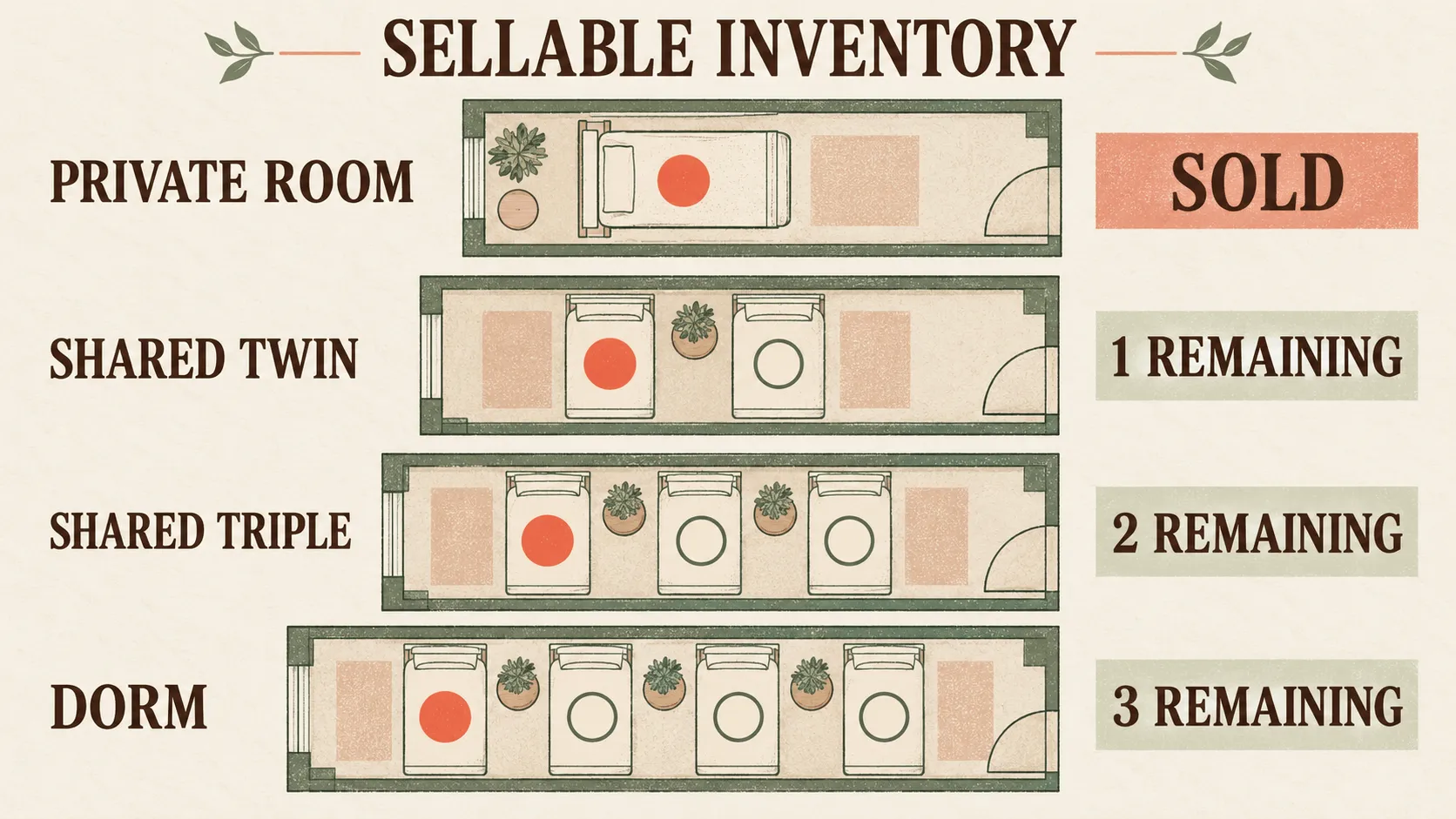
Before bookings open, list every physical room, its capacity, whether it will be sold privately or shared and what the guest is actually purchasing. The important number is not simply how many rooms you have. It is how many rooms or individual spaces you can still sell under the occupancy rules you have chosen.
Decide whether you are selling the room or the bed
A private room is usually sold as one bookable unit. Once somebody books it, that room is no longer available to another booking. Shared accommodation works differently if solo guests can buy individual places. A four-bed room can still have three sellable spaces after the first guest books.
This distinction matters because availability should match what is genuinely left to sell. Retreat Guru, for example, documents that shared-style availability can be calculated from open spaces, while hotel-style accommodation requires an available room. That is a useful operational distinction even if your own system uses different terminology. See the room-block availability reference.
Set capacity for twins, triples and dorm-style rooms
Write down the maximum occupancy of each shared space and decide how it will be offered. A twin might be bookable by two solo guests, a pair travelling together or one guest paying for private occupancy. A triple or dorm-style room may have several separately sellable spaces.
The rule needs to be clear before sales begin. Otherwise, the same physical room can accidentally be treated as both a complete room and a collection of individual beds.
Keep physical rooms separate from bookable room types
Your guest may book a category such as “shared twin” without needing to know whether they will eventually sleep in Room 4, Room 6 or another matching room. The category is what you sell. The physical room is what you assign later.
That separation is also how Gather approaches shared and private rooms. Gather Software supports shared and private room inventory, occupancy-based pricing, sold and remaining spaces, and guest details in one place.
Make private and shared room choices clear at booking
Every accommodation option should tell the guest how occupancy works, what the price covers and exactly what they are reserving. A private room, an entire shared room and one place within shared accommodation are different products operationally, even when they all sit inside the same retreat package.
Private room bookings
For a private room, make it clear whether the price covers the whole room and whether one or more occupants can stay there. If pricing changes based on occupancy, state that before checkout so the booking reflects the correct room setup from the beginning.
Shared retreat accommodation
For shared rooms, explain whether the guest is booking one bed or the entire room. This prevents a common ambiguity where the host thinks they have sold one place but the guest assumes they have reserved the whole space.
Solo guests booking into shared rooms
A solo guest can reserve one place in a shared room while the host continues selling the remaining spaces. This means booking count alone is not a reliable measure of accommodation capacity. Retreat Guru documents registrations that can contain multiple occupants and more than one lodging type, which shows why hosts need to track people and spaces rather than simply count bookings. See the multi-person registration reference.
Couples or friends who want to share
If two guests want to room together, decide whether they make one booking or separate bookings and how the relationship between those guests will be recorded. The important part is that the booking structure still reduces availability correctly and gives you enough information to pair them later.
Collect roommate requests without treating them as assignments
Ask guests who they would like to share with and capture any relevant sharing preferences during booking or intake, but do not treat that request as a confirmed room assignment. Keeping preferences separate preserves flexibility until you know final occupancy, available room combinations and whether both guests have made compatible bookings.
What to ask guests
Collect the name of the requested roommate and any accommodation-specific information you genuinely need to make the allocation. Avoid turning the room request into a general guest-notes field. The aim is to gather enough information to make the room decision, not to duplicate every piece of intake data.
How to handle mutual roommate requests
Where appropriate, check that both guests have requested the pairing and that they booked compatible accommodation. Two people asking to share does not automatically mean the available room type, occupancy or booking status makes that pairing possible.
Roommate requests are a normal reason to adjust physical room assignments. Retreat Guru explicitly includes them as one reason an operator might override an automatic room allocation. See the room-assignment guidance.
What to do when a requested pairing cannot be accommodated
Keep the request marked as a preference until you know you can honour it. If the room setup or remaining capacity makes the pairing impossible, you still have room to offer an alternative rather than having to undo a promise that was made during booking.
Assign guests to exact rooms in a second step
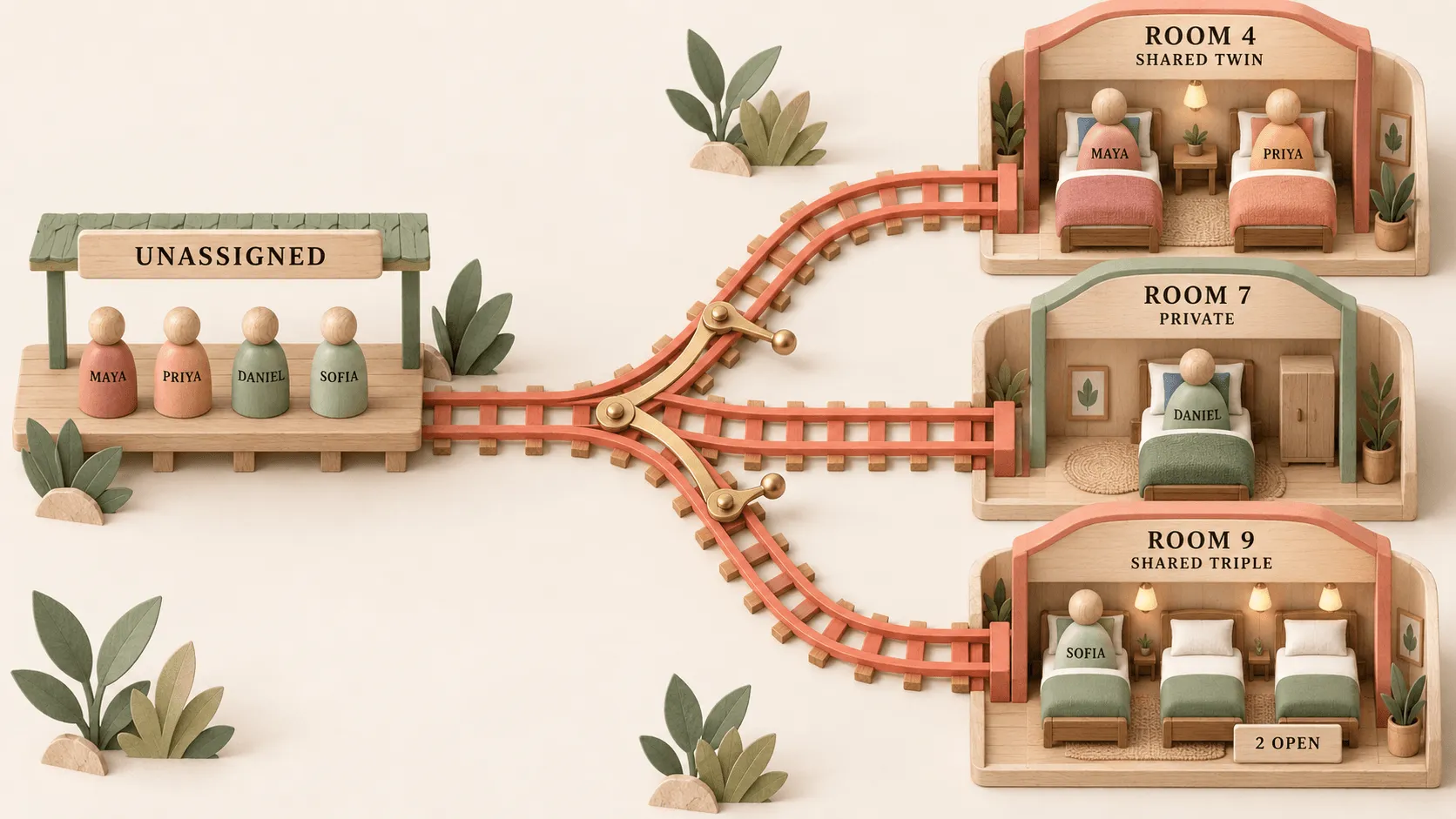
Protect the accuracy of your sellable inventory first, then allocate guests to physical rooms once bookings are stable enough to see occupancy, roommate requests and other operational constraints together. The booked accommodation type should remain distinct from the final room number so you can change assignments without losing track of what was originally sold.
Keep an unassigned guest list
Start with every guest who has booked accommodation but has not yet been placed into a physical room. That gives you one queue to work through instead of trying to assign rooms piecemeal each time a booking arrives.
Fill shared rooms systematically
Work through shared rooms using their real capacity. Pair requested roommates where possible, then use the remaining spaces for other compatible guests. A guest who purchased a shared twin place should ultimately be assigned to a physical room that matches that accommodation type.
The distinction between booked lodging type and physical room is not unique to one workflow. Retreat Guru also separates the type a guest booked from the physical room assigned behind the scenes. Its manual room-assignment documentation shows the same operational separation.
Avoid accidental overcapacity
After every assignment, check that no room contains more people than its intended capacity and that the number of assigned guests still matches the inventory sold. This matters most in shared accommodation, where several independent bookings may feed into the same physical room.
Lock assignments before the venue deadline
There is no universal date when every retreat should freeze its room plan. Use the venue's requirements, your booking pattern and the stability of roommate requests to decide. Once you reach that point, reconcile the full list before sending it.
Handle room changes without losing track of availability
Every room change has two sides: the guest's new assignment and the inventory that becomes occupied or available as a result. Update both at the same time. Otherwise, a change that looks correct on the guest record can leave your availability wrong and create space for an accidental double booking.
Private-to-shared or shared-to-private changes
An upgrade or downgrade can change the room type being consumed as well as the price. Release the original inventory before occupying the new category, then make sure any commercial difference is handled through the booking record.
Retreat Guru warns that manually moving guests into rooms that do not match their lodging type can contribute to double-booking problems, and that moving into another lodging type can affect price. See its registration-management guidance.
Cancellations and released beds
When a guest cancels, put the space back into inventory if it can still be sold. In shared accommodation, that may mean releasing one bed rather than reopening the whole room.
Guest substitutions
If one attendee replaces another, update the guest record and confirm that the replacement still fits the booked accommodation. Do not create a second room allocation while leaving the original guest occupying the same space on your working list.
Last-minute room moves
Late changes happen. Record the move in the same place you are using to manage the rest of the accommodation so the final rooming list and the actual room plan do not drift apart.
Build a retreat rooming list the venue can actually use
Your final retreat rooming list should be a clean operational handoff, not an export of everything you know about each guest. Include the details the venue needs to place people correctly, confirm dates and understand accommodation-specific requirements. Keep unrelated intake, marketing or personal information in your own guest records.
Internal working list versus venue rooming list
Your internal list may contain booking status, payment information, roommate preferences and notes that help you make decisions. The venue version should be narrower. A useful structure includes each guest's name, booked room type, exact room or bed, roommate where relevant, arrival and departure dates and necessary accommodation notes.
roomMaster's group rooming-list template similarly includes fields such as guest name, room number, room type, bed type, guest count, arrival and departure dates and special requests. It also recommends recording guests individually even when several people share a room. See the rooming-list template reference.
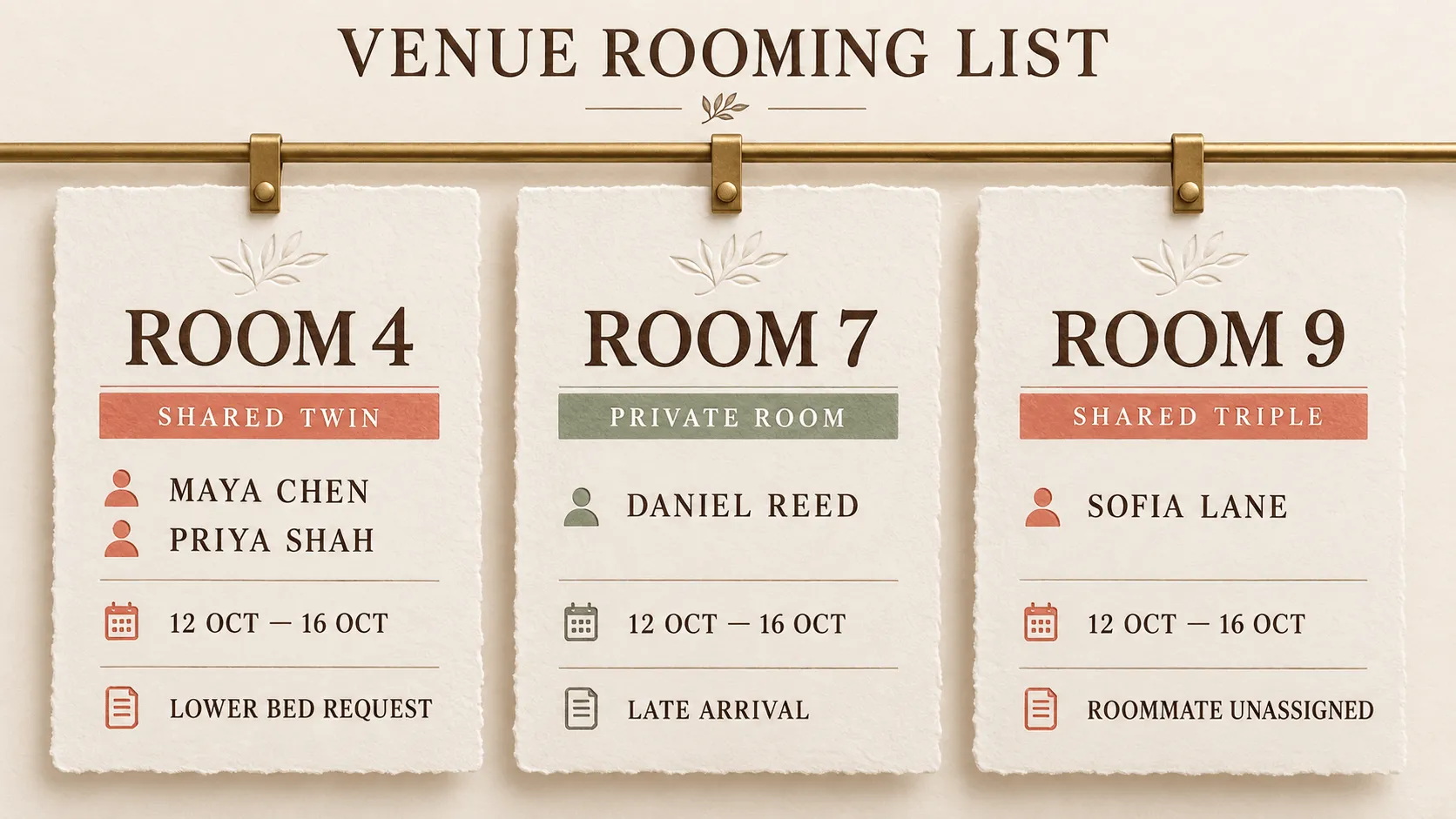
Guest name | Booked room type | Exact room | Roommate | Arrival | Departure | Accommodation notes |
|---|---|---|---|---|---|---|
Guest 1 | Shared twin | Room 4 | Roommate 1 | 12 Oct | 16 Oct | Lower bed requested |
Guest 2 | Shared twin | Room 4 | Roommate 2 | 12 Oct | 16 Oct | None |
Guest 3 | Private room | Room 7 | N/A | 12 Oct | 16 Oct | Late arrival |
Guest 4 | Shared triple | Room 9 | Unassigned | 12 Oct | 16 Oct | Vegetarian meal |
What to remove before sending
Strip out information the venue does not need for room allocation. That may include marketing consent, payment history, general form responses and unrelated dietary information. The rooming list should help the venue operate the accommodation, not become a second copy of your guest database.
Final reconciliation check
Before sending the list, confirm that every booked guest appears once, every assigned room respects capacity, the total assigned spaces match the accommodation sold and any cancellations or substitutions have been reflected. Then compare the final rooming list with your live booking records one last time.
A simple room assignment workflow for retreat hosts
A repeatable workflow is straightforward: define inventory, open bookings, collect sharing preferences, monitor remaining capacity, allocate exact rooms, reconcile the assignments and send the venue list. Keeping those steps in order stops room decisions from getting ahead of the booking data they depend on.
List physical rooms and decide which rooms or beds are sellable.
Create clear private and shared booking options with the correct capacity and pricing basis.
Collect roommate requests as preferences rather than confirmed allocations.
Monitor sold and remaining spaces as bookings arrive.
Move booked guests from the unassigned list into exact physical rooms.
Update both inventory and assignments whenever a guest changes room type or cancels.
Reconcile every guest and room before sending the final venue rooming list.
If room assignments are only one part of a wider workflow held together by separate forms and spreadsheets, this guide to retreat centre booking software covers how rooms, deposits and guest records can fit into the same operating process.
Manage retreat rooms without chasing spreadsheets
Once private rooms, shared beds, roommate requests and guest changes are moving at the same time, room assignments become easier when the booking record and room inventory stay connected. That reduces the need to reconcile separate forms, booking notes and room spreadsheets every time something changes.
Gather Software is built for independent retreat hosts and smaller retreat centres that have outgrown separate booking forms, payment links and spreadsheets. It can bring shared and private room inventory, occupancy-based pricing, sold and remaining spaces, bookings and guest details into one place, so the room plan starts from the same records you use to manage the booking.
Want to see how that could work with your current room setup and booking flow? Book a call.
Frequently Asked Questions
See where you are leaving bookings on the table
Book a call and we will tell you honestly whether Gather fits, and what to use if it does not.